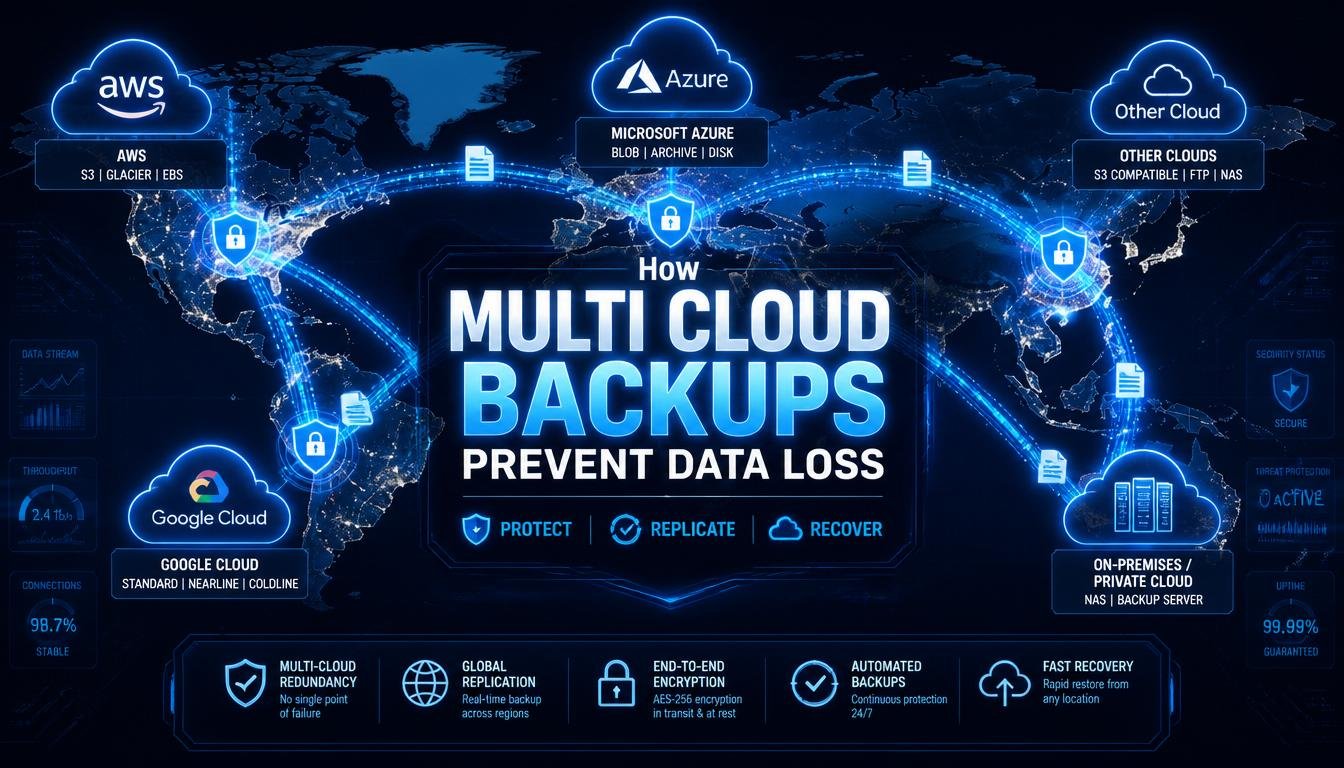
Using multiple cloud providers for your backup strategy is no longer a luxury reserved for massive financial enterprises. It is an essential engineering baseline to guarantee data resilience against cyberattacks, regional blackouts, and human error. Here is my personal guide to how multi-cloud backups work, the critical vulnerabilities they solve, and the exact architectural principles you need to use to secure your digital assets.
The Single-Cloud Concentration Trap:
Most modern engineering teams make a dangerous assumption: they believe that because their cloud provider promises “eleven nines” of data durability, their backups are automatically safe. This completely confuses durability with recoverability.
If an administrator accidentally runs a rogue script that drops a critical database table, or if an engineering team pushes an unverified patch that corrupts application files, that bad data is instantly synchronized across all your regional availability zones. Your cloud provider will happily preserve that corrupted data with perfect durability.
Furthermore, if your entire infrastructure, production, staging, and backups live under a single cloud company’s architecture, you suffer from single-cloud concentration risk. A massive global routing error, a catastrophic regional weather event, or a severe security breach at the cloud provider level can lock you out of your account entirely. If you cannot access your cloud console, your internal backups are completely useless to you.
The Evolution of Data Protection: The 3-2-1-1-0 Rule:
For more than two decades, the IT industry has relied on the classic 3-2-1 backup rule to keep systems safe. It was a beautiful, simple baseline: keep three copies of your data, stored on two different types of media, with one copy kept completely offsite.
But the rise of automated ransomware changed the rules of engagement. Modern attackers do not just encrypt your live production servers; they actively hunt down your backup configurations using stolen credentials to ensure you are forced to pay the ransom. If your off-site backup is connected to the exact same network identity provider as your production environment, the traditional 3-2-1 rule will fail you.
To combat this threat, we have evolved the framework into the strict 3-2-1-1-0 rule:
- 3: Maintain three unique copies of your data.
- 2: Store them across two different types of storage systems.
- 1: Keep at least one copy completely offsite.
- 1: Keep one copy entirely immutable or logically air-gapped in an isolated, separate cloud environment.
- 0: Achieve zero errors during your automated recovery validation tests.
The extra 1 and 0 are where multi-cloud backups shine. By pushing an immutable copy of your data to an entirely independent cloud provider that shares absolutely zero credentials, networks, or access keys with your primary cloud infrastructure, you create a brick wall that hackers cannot cross.
How Multi-Cloud Backups Stop Data Loss:
Splitting your backup destinations across diverse infrastructure giants like Amazon Web Services, Google Cloud Platform, and Microsoft Azure provides three critical layers of protection.
1. Defeating Credential Contagion:
The greatest threat to modern cloud deployments is credential contagion. If a developer’s laptop is compromised, or an access token is accidentally leaked on a public repository, an attacker can gain administrative privileges over your entire primary cloud account.
When you use a multi-cloud backup architecture, your secondary cloud repository operates under a completely separate Identity and Access Management (IAM) structure. The secondary cloud does not trust the primary cloud’s credentials. Even if an attacker gains absolute control over your main AWS account and deletes everything, they cannot access your isolated Azure or GCP backup vaults to destroy your recovery keys.
2. Immunization Against Vendor Lockout and Outages:
Cloud providers are run by humans, which means they are vulnerable to unexpected outages. Major cloud networks have suffered multihour collapses due to faulty DNS updates, internal software bugs, or power failures.
If your primary cloud goes dark during a critical business event, a multi-cloud backup system lets you execute cross-cloud recovery. Because your data is safely sitting in an alternative provider’s object storage, you can rapidly rehydrate your databases, spin up temporary compute containers, and keep your business operational while your main provider works to fix their system.
3. Granular and Cross-Cloud Recovery Paths:
Historically, disaster recovery meant cloning an entire virtual environment from scratch, a massive, time-consuming task that runs up thousands of dollars in data egress fees. Modern multi-cloud management platforms allow you to perform highly precise, granular recovery.
If a single database table gets corrupted on an AWS RDS instance, you can query your isolated Google Cloud Storage backup vault, extract that single specific record or table, and pull it back down without needing to rehydrate an entire multi-terabyte virtual machine. This saves valuable time and drastically lowers your Recovery Time Objective (RTO).
Single-Cloud vs. Multi-Cloud Backup Architecture:
Spreading your recovery points across multiple independent providers changes your risk profile completely. Here is how the two approaches compare side-by-side:
| Risk Parameter | Native Single-Cloud Approach | Advanced Multi-Cloud Approach |
| IAM Credential Compromise | High Danger: A single root breach can wipe out all backups. | Protected: Isolated identity providers block cross-cloud deletion. |
| Global Regional Outage | Vulnerable: Total system blackout stops business operations. | Resilient: Data remains fully accessible via alternative cloud portals. |
| Ransomware Protection | Moderate: Reliant on local bucket locks and retention tags. | Maximum: Logically air-gapped vaults stop malicious encryption. |
| Operational Visibility | Fragile: Fragmented across different regions and sub-accounts. | Centralized: One single plane of glass tracks backup health globally. |
| Data Egress Management | Flat: Low internal transfer costs, but high risk of vendor lock-in. | Optimized: Structured tiers move data strategically to minimize fees. |
Overcoming the Operational Challenge: Backup Drift:
The biggest mistake I see teams make when attempting a multi-cloud backup strategy is trying to manage each cloud provider using its own native, manual tools. If your engineers have to log into three different dashboards, write separate script formats for AWS snapshots, and manually tag resources in Azure, your system will eventually fall apart.
This fragmentation leads to a dangerous issue known as backup drift. A developer spins up a new database instance on a Thursday afternoon to patch a production bug, pushes the service live, and completely forgets to apply the correct manual backup tags. Because your systems are disconnected, that asset remains entirely unprotected until an incident exposes the gap.
To fix this, you must implement Cloud Backup Posture Management (CBPM). Instead of relying on manual checklists, deploy an automated, centralized control plane that plugs into all your cloud environments via secure APIs. This central engine continuously scans your global infrastructure, automatically discovers new databases or storage buckets, classifies data sensitivity, and applies your mandatory cross-cloud immutable backup policies without requiring any manual intervention.
Conclusion:
Building a resilient multi-cloud backup pipeline is the ultimate insurance policy for your digital infrastructure. By acknowledging that native cloud snapshots are not a silver bullet, upgrading your data protection framework to the modern 3-2-1-1-0 standard, and using automated posture management to eliminate hidden coverage gaps, you can completely isolate your critical data from the blast radius of ransomware, human mistakes, and system outages. Stop hoping that your single cloud provider will never fail; take control of your cross-cloud data architecture and ensure your business can survive any disaster.
FAQs:
1. Will moving data between different cloud platforms run up high egress fees?
Yes, cloud providers charge fees for data leaving their network, but you can minimize these costs by using incremental backups that only transfer changed blocks of data.
2. What makes a backup truly immutable in a multi-cloud setup?
An immutable backup is protected by a write-once, read-many lock that completely prevents anyone, including administrators, from deleting or altering the data until the retention timer expires.
3. How often should my engineering team test cross-cloud restoration workflows?
You should run automated file-level recovery tests every week and simulate full cross-cloud disaster recovery drills at least once every quarter to confirm validity.
4. Can a single ransomware strain infect multiple cloud providers simultaneously?
The ransomware itself cannot jump between clouds automatically, but it can spread if you make the mistake of using the exact same login credentials or access keys across both platforms.
5. What is the difference between data availability and data durability?
Durability ensures your files remain uncorrupted and intact over long periods, while availability measures whether you can actually connect to and access that data at any given moment.
6. How does a logical air-gap protect my secondary cloud repository?
A logical air-gap means the backup network operates on a completely isolated cloud account with zero persistent connections, shared networks, or shared access keys to your active production system.